Music production is no longer tied to expensive studios or powerful desktops. Today, a smartphone can be the starting point of a professional track — from beats and melodies to vocals and full arrangements. Many producers now sketch ideas on their phones and finish them on laptops, creating a seamless mobile-to-studio workflow.
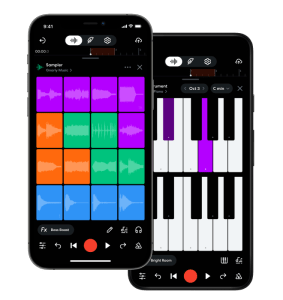
Here’s how modern producers are doing it.
🎛️ Step 1: Creating Beats & Patterns on Your Phone
Mobile music apps have evolved into serious production tools, not just toys.
Popular apps:
FL Studio Mobile – Create drum patterns, basslines, and synths with full MIDI control. Koala Sampler – Chop samples, record sounds, and build grooves fast. GarageBand (iOS) – Ideal for melodic ideas, chord progressions, and live instruments.
💡 Pro Tip: Keep patterns simple. The goal on mobile is idea capture, not perfection.
🎹 Step 2: Melodies, Chords & Synths on the Go
Modern phone synths rival desktop plugins:
BandLab – Cloud-based loops, instruments, and collaboration. Caustic 3 – Modular synths and beat machines for electronic music. KORG Gadget – Studio-grade synths optimized for mobile creativity.
These apps allow you to export MIDI files, which means your melodies can later control VST synths like Serum or Omnisphere on your laptop.
🎤 Step 3: Recording Vocals with Your Phone
Yes — vocals recorded on a phone can sound professional.
Tools:
BandLab – Built-in vocal effects, pitch correction, and noise control. GarageBand – Clean vocal takes with compression and EQ. Dolby On – Great for capturing raw vocals with smart enhancement.
🎧 Use wired earphones or a small mobile mic for best results.
📂 Step 4: Exporting Stems from Phone to Laptop
Once ideas are ready, export:
Audio stems (WAV/AIFF) MIDI files Tempo & key information
Most apps support:
Cloud sync (Google Drive, iCloud, Dropbox) Direct export to DAWs like FL Studio, Ableton Live, Logic Pro, or Cubase
This is where the magic happens.
🧠 Step 5: Finishing the Track on Your Laptop
On your laptop, you can:
Replace mobile sounds with high-end VSTs Refine arrangements Mix with professional tools (FabFilter, Valhalla, iZotope) Master the track for streaming or DJ sets
What started as a phone idea becomes a release-ready track.
🔥 Why This Workflow Is Powerful
Inspiration captured instantly No studio needed to start Ideal for travel, commuting, or late-night creativity Used by bedroom producers and touring DJs alike
The phone becomes your sketchbook, the laptop your final canvas.
🎧 Final Thought – Best DJ Podcast
Great music isn’t about where you start — it’s about how you finish.
With today’s mobile apps and smart workflows, your next club track, remix, or podcast intro could begin right in your pocket.
From phone… to studio… to the world. 🌍🎶




 BEST DJ - Music - Games - Movies - Review’s